crımson
COLOR LAB
Cinematic looks for every major camera log, previewed live on your own footage.
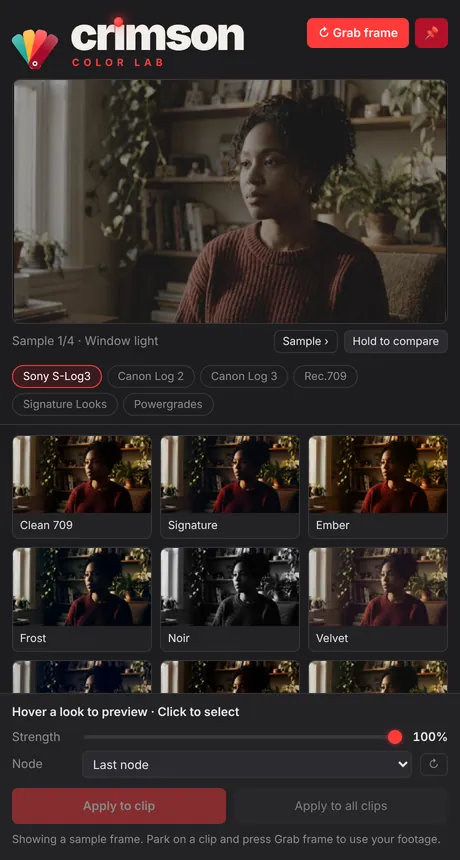
18 original Crimson looks, built for 13 camera log formats plus Rec.709: Sony, Canon, Apple, DJI, Blackmagic, Panasonic, Fujifilm, Nikon, RED and ARRI. The Resolve panel grabs your frame, shows every look on it, and applies the one you pick in a single click.

 S-LOG3SIGNATURE
Drag to compare · Sony S-Log3 → Signature
The looks
Try the looks, one click each
Pick a frame, then click any look. These are 12 of the 18 Color Lab LUTs applied to S-Log3 footage, exactly what you get in the pack.
 Signature · Window light
How it works
From flat log to finished grade in three moves
One installer puts the looks into DaVinci Resolve, Premiere Pro and Final Cut Pro. In Resolve Studio you also get the Crimson Color Lab panel.
Your frame, not a stock photo
Park the playhead and press Grab frame. The panel takes a clean copy of the frame and ignores any grade already on the clip.
Hover every look
Pick your camera tab and hover. Each look renders live on your footage, and you can hold to compare with the original.
One clip or the whole timeline
Dial the strength, choose a node and apply. Crimson writes the LUT to your node and labels it, so you can keep grading on top.
Features
Made by a working cinematographer
Built from the camera math
Every log look starts from each manufacturer's published log curve and color gamut, from Sony and Canon to Apple, ARRI and RED, so skin and highlights land correctly instead of being guessed.
Conversion included
Each log look already converts to Rec.709. There's no extra conversion LUT to stack, and Clean 709 gives you a natural starting point.
Strength you can dial
Set a look anywhere from 0 to 100%. The panel builds a matching LUT on the fly, so a 60% Bloodline is still one node.
Exclusive Signature Looks
Crimson, Signature, Golden and Pop are exclusive to the Signature tab and built for all 13 camera logs plus Rec.709, with three bonus looks and a full Workflow Powergrade for Resolve.
Four sample frames built in
Try every look the moment the panel opens, before you've even loaded footage.
Works everywhere
Standard 33-point .cube files for Resolve (free or Studio), Premiere Pro, Final Cut Pro and any app that reads LUTs.
Specs
What you need
| Cameras | Sony S-Log3 · Canon Log 2 & 3 · Apple Log & Log 2 (iPhone 15–17 Pro) · DJI D-Log · Blackmagic Film Gen 5 · Panasonic V-Log · Fujifilm F-Log2 · Nikon N-Log · RED Log3G10 · ARRI LogC3 & LogC4 · Rec.709 |
|---|---|
| Panel | DaVinci Resolve Studio on Mac or Windows. Opens from Workspace → Workflow Integrations. |
| LUTs | DaVinci Resolve (free or Studio), Premiere Pro (Lumetri) and Final Cut Pro (Custom LUT). |
| Format | 33-point .cube files, plus a .drx Powergrade. |
| Price |
What you get
- 18 Crimson looks × 14 formats (252 LUTs)
- 4 exclusive Signature looks for every camera, plus 3 bonus
- Workflow Powergrade for Resolve
- Crimson Color Lab panel for Resolve Studio
- Mac and Windows installers and an install guide
Not included
- The panel in free Resolve (the LUTs still work)
- Panels for Premiere or Final Cut
- Exact conversions for DJI D-Log M, D-Log 2 or Insta360 I-Log (use the maker’s free LUT, then a Rec.709 look)
FAQ
Questions colorists ask
Which camera folder should I use?
Pick the folder named after your camera’s log: Sony S-Log3, Canon Log 2 or 3, Apple Log or Apple Log 2, DJI D-Log, Blackmagic Film Gen 5, Panasonic V-Log, Fujifilm F-Log2, Nikon N-Log, RED Log3G10, ARRI LogC3 or LogC4. Use Rec.709 for normal footage. For DJI D-Log M, D-Log 2 and Insta360 I-Log, apply the maker’s free conversion LUT first, then a Rec.709 look.
Do I need a conversion LUT first?
No. Every log look already converts your footage to Rec.709. Stacking a second conversion will make it too contrasty.
Does it work with the free version of DaVinci Resolve?
The LUTs work in free Resolve: right-click a node and choose LUT → Crimson Color Lab. The live-preview panel needs DaVinci Resolve Studio, because only Studio supports Workflow Integrations.
Can I use it in Premiere Pro and Final Cut Pro?
Yes. The installer adds the log looks to Lumetri's Input LUT menu and the Rec.709 looks to Creative → Look. In Final Cut Pro, add the Custom LUT effect and choose Crimson Color Lab from its LUT menu.
Will it overwrite my grade?
No. The panel writes the LUT to the node you pick (the last node by default) and leaves the rest of your nodes alone. The Workflow Powergrade is the exception, since it loads a full node tree in place of the clip's current one.
Why does my computer warn me during install?
The installers aren't signed by Apple or Microsoft yet. On a Mac, right-click the installer and choose Open. On Windows, click More info, then Run anyway. The install guide walks you through it.
Can I use the looks on client work?
Yes. Use them on any project, personal or paid. Please don't resell or share the LUT files themselves.
I bought it. How do I get help?
Email Ehardtmedia@gmail.com with your order email and a screenshot, and you'll hear back within two business days.
Grade like the frame deserves.
Need sound too? Crimson SFX Deck is the sound-effects panel from the same team.